Representative image. Sahil Dhiman, CC BY-SA 4.0, Wikimedia Commons

Why it matters
The map lets a buyer see what other users' tests recorded on each network nearby before choosing a SIM or a broadband plan. TRAI itself says the figures are not a full quality assessment, so they are a guide rather than a guarantee.
The Telecom Regulatory Authority of India (TRAI) on Wednesday, 4 November 2026, launched Network Anubhav, a public dashboard that puts internet speed tests and call quality ratings sent in by mobile and broadband users on a map. Anyone can open it at anubhav.trai.gov.in, zoom into an area and see how tests there have gone for each service provider, according to TRAI’s press release No. 149/2026.
The same portal also gives web access to TRAI’s Do Not Disturb (DND) service, used to block promotional calls and messages and to complain about spam. The news agencies PTI and ANI, Zee Business and the Times of India all reported the launch on Wednesday.
What Network Anubhav shows on its map
Network Anubhav is built on two kinds of data. The first comes from TRAI’s own apps: MySpeed, which runs an internet speed test on your phone or computer, and MyCall, which asks users to rate a voice call. The portal says MyCall users can rate a call on a scale of 1 to 5 after it ends. The second is the results of independent drive tests carried out for TRAI.
On the map, results are split into cellular (mobile) and fixed broadband. Each group can then be broken down by service provider and by network technology. The release lists download and upload speeds among the parameters shown. Users can move around and zoom to see where tests were taken, and use filters, legends, tables and downloadable reports to read the results.
TRAI’s release does not name any operator. It says only that results are segregated “service provider-wise”, and the portal’s home page says tests can be compared across operators, technologies and regions.
How to read the P50, P80 and P90 speed figures
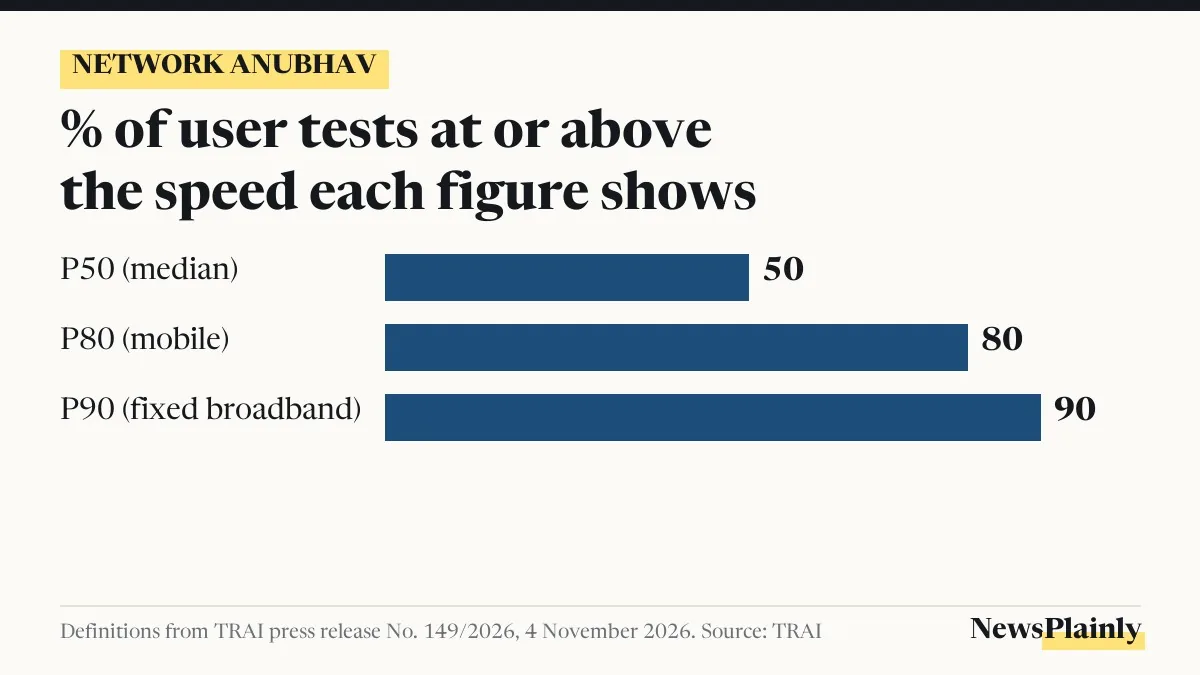
The dashboard does not show a single average internet speed for an area. It shows percentiles worked out from the tests users in that area ran, and the release defines three of them:
- P50, the median: half of the tests recorded this speed or more.
- P80, for mobile broadband: 80% of tests recorded this speed or more.
- P90, for fixed broadband: 90% of tests recorded this speed or more.
A simple illustration, made up by NewsPlainly and not taken from the dashboard: if ten mobile tests in one area came in at 8, 12, 15, 20, 22, 25, 30, 35, 40 and 60 Mbps, the P80 figure would be 15 Mbps, the third-lowest reading, because eight of the ten tests were at or above it. The median would sit between 22 and 25 Mbps. So the median shows the middle of the readings, while P80 shows a speed that eight in ten tests reached or beat.
For someone choosing a connection, the higher percentile is a check on the low end: it shows a speed most tests reached, not the best result someone happened to get.
How to use Network Anubhav to check internet speed in your area
From what the release and the portal describe, a user can work through it like this:
- Open anubhav.trai.gov.in in a browser.
- Choose cellular or fixed broadband, depending on whether you want mobile data or a home connection.
- Filter by service provider and by technology.
- Move the map to your area and zoom in to see where tests were run.
- Read the P50 and P80 (mobile) or P90 (broadband) figures, and download the report if you want to keep it.
To add your own speed test results to Network Anubhav, the portal points users to the MySpeed and MyCall apps, which it says are available on Android, iOS and the web. TRAI encouraged consumers to contribute tests regularly through the apps, saying wider participation will improve the coverage of the information on the platform.
TRAI is also offering a MySpeed software development kit (SDK), a set of tools that lets eligible third-party apps build in its speed measurement. The release says wider use of it could raise the number of real-world measurements feeding the dashboard.
Spam complaints and DND on the web through Network Anubhav
The second change is for people who get unwanted promotional calls and texts. According to the release, DND can now be used through a web interface on the Anubhav portal. Users can set their preferences for commercial communication, file complaints about unsolicited commercial communication (spam calls and messages from businesses), track the status of a complaint, and see complaint figures in total and for each service provider.
On 3 November, NewsPlainly reported on TRAI’s telecom complaint rules, which set penalties for operators that close complaints wrongly.
What the platform does not do
TRAI’s release puts limits on these numbers. It says values from user tests do not represent a comprehensive assessment of network quality based on standard methodology, though they show what other users experienced at various locations. Zee Business noted that the results depend on how many speed test readings were taken and where.
Readers should keep a few limits in mind, based on the release and the reporting:
- Network Anubhav is not a formal quality audit of operators. Its user figures come from people who chose to run a test, alongside the drive test results.
- The release does not describe any way to get a slow connection or a dropped call fixed through the dashboard. It notes that TRAI does not provide direct consumer services, and that individual service problems go to your own provider through its complaint and grievance process.
- An area with only a handful of speed test results may show figures that say little about the network there.
Who else uses the data
Operators get a separate, secure view. Through it, they can see call quality, coverage and internet test data sent in by consumers, along with the location, date, time and technical values of each test, so they can find places that need more work on the network. TRAI says it can use the combined data for evidence-based monitoring of consumer experience.
Launching the platform, TRAI Chairman Anil Kumar Lahoti said it “brings greater transparency to observed network tests conducted by Consumers and TRAI”. He said it lets consumers analyse tests by location and service provider and helps operators find areas for network improvement.
The release did not give figures on how many tests are on the platform so far or how often the map is refreshed.
Frequently asked questions
What is TRAI Network Anubhav?
It is a TRAI dashboard at anubhav.trai.gov.in that maps internet speed tests and call ratings from its MySpeed and MyCall apps along with its own drive tests. It also offers DND services on the web.
How can I check internet speed in my area on Network Anubhav?
Open the portal, choose mobile or fixed broadband, filter by provider and technology, and zoom to your area. It shows P50 and P80 (mobile) or P90 (broadband) speeds from users' tests there.
Can I file a spam complaint on Network Anubhav?
Yes. TRAI says DND is now available through the portal's web interface, where you can set preferences, complain about spam calls and messages, and track the complaint.
Are Network Anubhav speeds official ratings of operators?
No. TRAI says user test values are not a comprehensive assessment of network quality under standard methodology. They show what other users experienced.